Understanding Chatbot Analytics
S4B AI Inspector provides chatbot analytics to help site administrators understand how visitors see and interact with chatbots on a WordPress website.
Overview
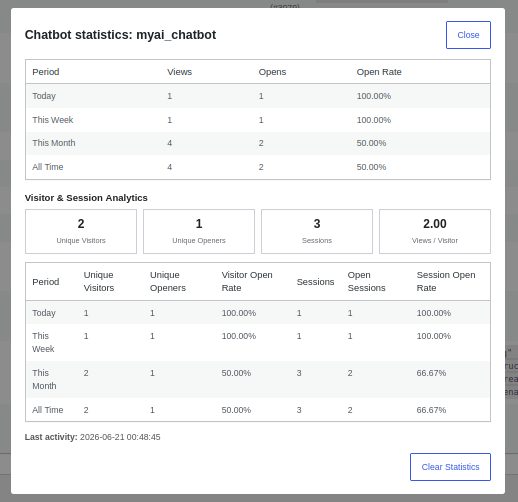
Chatbot analytics show more than simple view and open counts. They help you understand how many real visitors saw a chatbot, how many opened it, and how often chatbot engagement happens during website sessions.
Available Metrics
- Unique Visitors – The number of individual visitors who viewed the chatbot during the selected period. Each visitor is counted only once, even if they viewed the chatbot multiple times.
- Unique Openers – The number of individual visitors who opened the chatbot at least once. Each visitor is counted only once, regardless of how many times they opened it.
- Sessions – The number of browsing sessions where the chatbot was viewed. A single visitor may create multiple sessions by returning to the website later.
- Open Sessions – The number of browsing sessions where the chatbot was opened at least once.
- Visitor Open Rate – The percentage of unique visitors who opened the chatbot after viewing it.
- Session Open Rate – The percentage of sessions that included at least one chatbot opening.
- Views per Visitor – The average number of chatbot views per unique visitor.
Example
| Metric | Example Value | Meaning |
|---|---|---|
| Unique Visitors | 100 | 100 individual visitors saw the chatbot. |
| Unique Openers | 25 | 25 visitors opened the chatbot. |
| Visitor Open Rate | 25% | One out of four visitors opened the chatbot. |
| Sessions | 140 | The chatbot appeared during 140 browsing sessions. |
| Open Sessions | 35 | The chatbot was opened in 35 sessions. |
Why These Metrics Matter
Basic statistics show how many times a chatbot was displayed or opened. Visitor and session analytics provide a clearer picture of real engagement.
They help answer questions such as:
- How many individual visitors saw the chatbot?
- How many visitors actually opened it?
- How often does the chatbot get opened during website visits?
- Do visitors see the chatbot multiple times?
- Which chatbot placements attract real engagement?
How It Works
When a chatbot is displayed, S4B AI Inspector records a chatbot view. When a visitor opens the chatbot, it records a chatbot open. These events are connected with visitor and session identifiers to calculate advanced statistics.
Feedback
We continue improving chatbot analytics and reporting features. Feedback and suggestions are welcome.